Showing posts with label Android. Show all posts

Sunday, March 3, 2013

Delegate Design Pattern : Objective C vs Java

One of the most used design patterns in iOS is Delegate Design Pattern. The main usage on this design pattern is to delegate some functionality from called component to caller controller. On image below is shown simple diagram of this pattern where from main controller we call custom component with action to show data from concrete page loaded from the model. The custom component loads data and then displays. In case when no data is loaded for requested page the custom component throws notification thru implemented method in main controller from the custom component protocol. We can look on protocols in Objective C as in interfaces  in Java so the method which is defined in the protocol should be implemented in the the controller that expect some event delegated from the custom component, and also set instance on the caller controller to the custom component where the custom component will use method declaration to send some data to the caller controller or will try to execute the method.

       Delegate Design Pattern

To be much easier to understand, we’ll make comparison on implementation on delegate design pattern in iOS and in Java and we’ll see how can we create custom components in both platforms and use that components to return data to controllers where they are called.

Objective C version

ViewController.h

#import
#import "ServiceConsumer.h"

@interface ViewController : UIViewController

@end

ViewController.m

#import "ViewController.h"

@interface ViewController ()

@end

@implementation ViewController

- (void)viewDidLoad
{
[super viewDidLoad];
// Do any additional setup after loading the view, typically from a nib.
ServiceConsumer *consumer = [[ServiceConsumer alloc] init];
consumer.delegate = self;
[consumer returnNumberToDelegate];
}

#pragma mark -
#pragma mark - ServiceConsumerDelegate methods

- (void)executeWithResult:(NSInteger)testValue {
NSLog(@"Returned value from delegate is %d", testValue);
}

- (void)didReceiveMemoryWarning
{
[super didReceiveMemoryWarning];
// Dispose of any resources that can be recreated.
}

@end

In header file we import delegate module but also we conform with the delegate of the module. In implementation we make instance from the service consumer but also we set the delegate to self which mean we need to implement the methods defined in the protocol.

 ServiceConsumer.h

#import

@protocol ServiceConsumerDelegate

- (void)executeWithResult:(NSInteger)testValue;

@end

@interface ServiceConsumer : NSObject

@property (nonatomic, strong) iddelegate;

- (void)returnNumberToDelegate;

@end

ServiceConsumer.m

#import "ServiceConsumer.h"

@implementation ServiceConsumer

@synthesize delegate;

- (void)returnNumberToDelegate {
[self.delegate executeWithResult:32];

}


@end

In ServiceConsumer header we can see the protocol definition but also the most important line, property definition as id – generic object that have to confirm to the protocol defined in here. In implementation we can see the method that call method executeWithResult which is defined in the protocol but it call it from the delegate property which mean that the class that will have implemented the method defined in the protocol and also confirms with the delegate, if that class call the method returnNumberToDelegate from the ServiceConsumer that class will receive the response in implemented method executeWithResult. We can see that the functionality is delegated thru line [self.delegate executeWithResult:32];

Java version

With creation on instance of the ServiceConsumer we initialize engine with the instance that implements IServiceConsumer interface. That is done in constructor here. In this class we also have one method returnConsumerData that same as in Objective C version, if is called from the class that implements that interface and have implementation for method printMessage defined in the interface, this method will call that method thru the instance set to interface in the constructor.

ServiceConsumer.java

public class ServiceConsumer {

private IServiceConsumer consumer = null;

private static final String MESSAGE_0 = "MACHINE IS RUNNING";
public ServiceConsumer(IServiceConsumer consumer) {
super();
this.consumer = consumer;
}
public void returnConsumerData() {
this.consumer.printMessage(MESSAGE_0);
}
}


In Java version instead of protocol in Objective C we need to have interface with defined method.

IServiceConsumer.java

public interface IServiceConsumer {
public String returnConsumerData(String data);
public void printMessage(String messgeData);
}

The class that calls the engine makes instance from the ServiceConsumer class with setting the Machine.this to the constructor of the ServiceConsumer class because it already implements the interface. Also because it implements the interface it should also implement the methods defined in the interface in this case returnConsumerData. Method loadConsumerData is used to call returnConsumerData method implemented in the ServiceConsumer, which after calling return data thru method printMessage.

Machine.java


public class Machine implements IServiceConsumer {
private ServiceConsumer consumer = null;
public Machine() {
this.consumer = new ServiceConsumer(Machine.this);
}
public void loadConsumerData() {
this.consumer.returnConsumerData();
}


@Override
public String returnConsumerData(String data) {
// TODO Auto-generated method stub
return data;
}

@Override
public void printMessage(String messgeData) {
// TODO Auto-generated method stub
System.out.println(messgeData);
}

}


Thursday, August 30, 2012

Wheel of Millionaires v1.0

Because my game Wheel of Fortune was suspended on the Android Market now Google Play because of breaking some rights for the name, now is much better with new UI, faster and more realistic wheel and more words... the new name is Wheel of Millionaires.


Enjoy.


Saturday, March 3, 2012

Easy Math v1.0

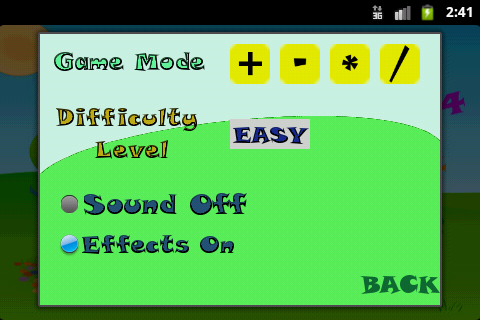
Easy Math is simple math quiz for kids. It teaches your kid basic math operations and improves your children math skills by playing.

***** "My kid love this game is so much fun" *****

Making simple and easy educative game for preschoolers that can help them  learn with joy is the most challengeable job. Because the kids are the most significant we created the most enjoyable game for easy learning math basic operations.
The kids just love to play Easy Math.

**** Math Operations ****

Easy Math can help your child to improve the basic math operations that include:

✔ addition,
✔ subtraction,
✔ multiplication,
✔ division

***** How will my kid learn? *****

Your kid will learn while playing and guessing the correct answer with different math operations and difficulty level. Your kid will enjoy learning.

***** How is your game so popular? *****

Easy Math and also  our other educational games are so popular because we strive on building simple and easy games that can help your kid  learn on easy way. Our educational games do not mix different features, for example, our math games does not teach letters and also our letter games does not involve math.
Our games are fun and enjoyable :)

We also want to hear from parents and children different experience from playing our educational games to improve your child education together.

Enjoy.


Monday, January 23, 2012

Yatzy Championship

The most playable and the most advance yatzy game on the market. With more then 200000 players Yatzy Championship is first choice for yatzy players. Yatzy Championship is the first yatzy game with 6 columns which makes this game the most attractive yatzy game on the market. Play with five or six dices, save and resume game, share your result on the Yatzy Championship game server and learn how to play from other players shared results, challenge yourself.


Rules can be seen on the older version known as My Yahtzee:
http://genitravel.blogspot.com/2010/09/my-yahtzee.html

Note: Does not follow original Hasbro Yahtzee rules.

Enjoy.

Market Place:
 https://market.android.com/details?id=com.dreamcode.yatzychampionship


Saturday, June 18, 2011

Fun Words V1.0

After long time here is my new addictive game for Android.
Play different levels, guess as many words you know and challenge your knowledge.

Enjoy.

Sunday, March 27, 2011

Bingo Championship V1.0

If you like to play Bingo, this game will be your most playable and addictive Bingo game you have ever played. You can play single game or against the mobile bots that will make your game more and more unpredictable.

Downloadable via QR code.


Enjoy.

Saturday, December 11, 2010

Wheel Of Fortune V1.0

Wheel of Fortune is first game for Android, based on the original quiz Wheel of Fortune.
Its very exciting, offering a lot of fun and enjoyment to its players.

Downloadable via QR code.


Have fun.


Sunday, November 14, 2010

Smart Hangman V1.0

This is first implementation on Smart Hangman which is with a bit different rules of known hangman games. The main difference is that this hangman has additional jokers which will make your playing more interesting. There are five categories of secret words each one containing words with different hardness. Smart Hangman will be constantly updated with new categories and words which will make you more addictive to the game.

Enjoy.

Wednesday, September 22, 2010

Smart Memory v1.0

Every time when i travel somewhere i play some simple games until i arrive. There are many small, simple and addictive games for playing on Android platform and for that reason i decide to develop one simple game based on memory but with different rules which means existence of some hidden artefacts, each of them with different meaning. The Smart Memory is very addictive and useful game for developing cognitive functions. It has three playing levels and five different card packs:

* Animals
* Fruits
* Smileys
* Flags
* Funny Creatures

Enjoy.

Saturday, September 4, 2010

My Yahtzee v1.0

My Yahtzee is the first Android Yahtzee game with 6 columns. Till now, the max number of columns in the existing Yahtzee games for Android was 4. Many years ago, I developed a desktop version with 8 columns, which was also the first game with more than 6 columns (for desktop version), and for that reason i decided to reimplement my desktop version, but this time for Android phones. For now, My Yahtzee is a single player game, I plan to implement AI bot in the near future, which will also give My Yahtzee a bit more intelligence for playing against the phone. Implementation of multiplayer mode is also in plan.


My Yahtzee Rules

Rolling the Dice
There are six dices which you can roll. To roll dices press the button Roll.
Picking the dice is simple, just press on dice that you want to keep, on next roll value of selected dice will not be changed.
Maximum number of selected dices are 5, the 6th dice is bonus dice for playing.
Maximum number of rolling is 3, you can't roll more then 3 times. After rolling you must score the roll.
Once you've scored the roll, you roll all the dice again and repeat the process.
You continue until all 13 categories have been filled for every column, at which time the game is over.

Scoring
Once you have the dice face combination you want to score, you score the roll in one of the 13 categories.
You do this by clicking on one of the cells in chosen column.
Once a category has been scored, you can change the value by pressing the Undo button and repeat rolling and scoring again.
Each category defines its own scoring rules, but also each column define own playing rule.

Columns Rules
First column starts from 1, every cell must be scored.
Second column is free column, each cell can be scored in order by free choice.
Third column starts from Yamb, every cell must be scored.
Forth column is scoring by hand which mean, after first roll you need to pick some dices and score the cell. Scoring in this column
is in order by free choice.
Fifth column have two starting points, from cell Max to cell 1, and from cell Min to cell Yamb, each cell must be scored.
Sixth column have also two starting points, from cell Yamb to cell Min and from cell 1 to cell Max, each cell must to be scored.

Categories Rules
In the lower scores, you score either a set amount (defined by the category), or zero if you don't satisfy the category requirements.
Max is total sum of all 5 dices also Min is total sum of all 5 dices, total Max/Min value in current column is subtraction between Max value and Min value.
For 3 of a Kind (triling), you must have at least three of the same die faces. If so, you total all the die faces and score that total plus 20 points bonus.
Similarly for 4 of a Kind (poker) , except that you must have 4 of the 5 die faces the same. Total all die faces plus 40 points bonus.
Like in poker, a straight is a sequence of consecutive die faces; a small straight is 4 consecutive faces, and a large straight is 5 consecutive faces.
Depending on roll count, for first roll dices score is 66 points , second 56 points and third 46 points.
Full House is a roll where you have both a 3 of a kind, and a pair. Full house is sum of all 5 dices plus 30 points bonus.
A Yahtzee (yamb) is a 5 of a Kind (i.e. all the die faces are the same), and the total is sum of all five dices plus 50 points bonus.

That's all for now, feel free to download it and play.

Thursday, August 5, 2010

Lucky Cookie v1.0

Sometimes when i have free time and i dont have anything interesting to do i play some easy games on the internet and sometimes i read some psychology literature. Two days ago i decide to make some easy application for Android which will display different message every time when i click on some cookie. When i implemented that i decide to hide the message and to randomize the cookies every time when i start the application. Every time when message is found the message have different meaning. I implemented that, and in one moment i decide to change the idea behind that simple application and to implement some randomization functionalities and also to test my Android CRUD Code Generator for generating simple SQLite database that will keep scores. After that, that simple application become simple game for relaxation.
You can download from the market for free.

Monday, August 2, 2010

Calories Tracker Lite v1.0

First version from application Calories Tracker is finally released on the Android Market.
This version contains four functionalities that can help you to keep your ideal body weight.
First functionality is to keep profile with detail informations about current body weight characteristics, second functionality is calories calculator, for easy calculation on burned calories and time spend to burn that calories depending on chosen activity, third functionality is activities comparator that will help you to decide which activity is suitable for you based on burned calories and time spend for burning that calories, and forth functionality is simple workout manager where you can track in realtime how many calories you have burned in practicing the chosen activity.
Download and use this application for free.

Below are shown some screenshots from Calories Tracker.

Sunday, August 1, 2010

Generate Android Application From XML Definition

Two weeks ago i was searching for some tool which will boost my development on great Android platform. Because in every application there are some methods, classes, that are repeatable i thought that maybe there are some utilities that will generate that classes for me on which every developer spend some time to write them from scratch. After long time for searching i found only SQLiteGen tool which generate data access class for written simple interface and nothing more which is only one part from developed application. SQLiteGen is great tool but there are things that are still missing and should be programmed again and again for every application.
For completely crud application we need entity classes, db helper class or content provider, dao classes and basic generated activities for manipulating the data. For that reason i came with idea to implement simple crud code generator which will generate crud application based on simple xml definition on entity classes, and then Android CRUD Code Generator is born.

Android CRUD Code Generator contains 5 different generators, Activity Generator, Dao Generator, DBHelper Generator, Entity Generator and Service Generator.

DBHelper Generator generate dbhelper class that is used for creating application database. Generated DBHelper class is singleton class for better reusing on database connection.
Entity Generator generate entity classes with getters and setters for every database table defined in xml definition file.
Dao Generator generate basic crud operations for every entity class in classical DAO way, separated implementations from interfaces. Every DAO implementation is also singleton class.
For now those 3 generators are implemented and implementation on Activity Generator is in process.
In second phase there are plans for implementing simple DSL that will be written in XML definition file and from which specific code will be generated by Service Generator.

In the next post i'll show how to develop simple crud application from xml entity description, i hope by then i'll finish Activity Generator :)